Calories is Time Template Guide
How to set up Calories is Time, what a normal day looks like, and how every formula behind the calorie debt, streak and calendars works.
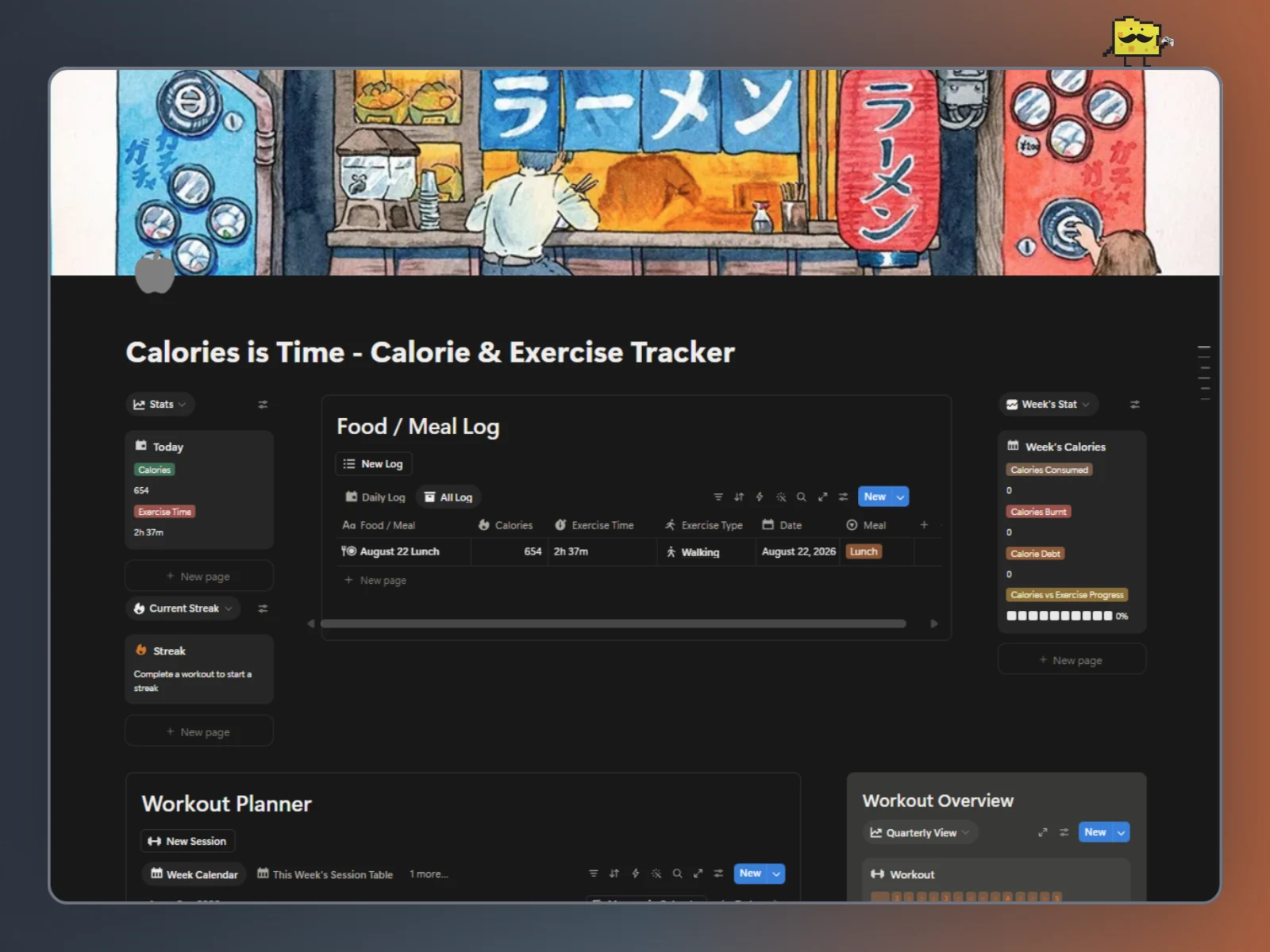
Calories is Time - Calorie & Exercise Tracker
This guide shows you how to set up Calories is Time, how a normal day with it works and how every part is built. You don't need to read all of it. Set it up, then come back when you want to change something or you're just curious.
Lots of calorie trackers just give you a number. Sometimes that's hard to understand, so Calories is Time gives you that number as time. Log a meal, pick an exercise and Calories is Time tells you how long you'd need to do that exercise to burn it off. Then it tracks the workouts you actually do and shows how much of your week's food you've covered.
The loop is simple:
Log food → See the time → Work out → Watch your progress
Where to start: If you just want to use Calories is Time, read The Set Up, A Day With Calories is Time and Tips & Tricks. If you want to change how it behaves, jump to Understanding the System, Customization Ideas and Safe Customization Rules.
Duplicate the template before you change anything. Calories is Time is easy to make yours but some parts are technical. A duplicate gives you somewhere safe to break things.
It's an estimate. Calories is Time is built for awareness and motivation. Calorie burn depends on your body and effort, so treat the numbers as a guide. It isn't a replacement for professional nutrition or medical advice.
The Set Up
Checklist:
- Set your exercises and their calories per hour
- Pick the exercise for your food log
- Log your first meal
- Plan and finish your first workout
- Add a goal
Step 1: Set Your Exercises
Everything in Calories is Time starts here. The Exercise Database is the list of activities Calories is Time can convert calories into. Each exercise has three properties:
Exercise: the name, like Walking or Swimming.Category: Cardio, Strength, Sport or Flexibility.Calories Burned /hr: how many calories you burn in one hour of it.
The template comes with exercises already filled in (Walking is 250, Strength Training is 300 and Swimming is 700, for example). They're starting points. Edit them, delete the ones you'll never do and add your own.
Getting numbers that fit you. Calorie burn depends on your weight, age and how hard you go, so the defaults won't match everyone. Use an online calculator like the WebMD exercise calculator and type in your own numbers. Make sure the number is for one hour, because Calories is Time divides everything by the hour.
Every exercise needs a number. If Calories Burned /hr is empty or 0, anything that uses that exercise has nothing to calculate with. Calories is Time will show "Calories or Exercise Type is empty" instead of a time.
Step 2: Pick the Exercise for Your Food Log
This is the default exercise Calories is Time uses when it tells you how long a meal would take to burn. Pick the one you actually do most. If you walk every day, pick Walking and your meals will show as walking time but you can change it anytime.
There are two places to choose it:
- For new food entries: use the page template of Food / Meal Log.
- Edit the page's template by clicking the down arrow next to "New"
- Edit "New Log"
- Go to
Exercise Typeand replace "Running" - Choose your exercise
- Close settings by clicking outside the page
- For the daily total: open the Today's Calories page, then pick an exercise in
Exercise Database. That's the exercise used for "how long to burn everything I ate today".
You can change an individual entry any time too. Open the food entry and change its Exercise Type.
Step 3: Log Your First Meal
Press the New Log button in the Food / Meal Log and fill in:
Food / Meal: what you ate, like "Chicken wrap".Calories: how many calories it was.Meal: Breakfast, Lunch, Dinner or Snack. Optional, but handy for grouping.Date: the day you ate it.
You'll see Exercise Time fill in on the entry straight away. It's showing the time required to burn those calories. For example, a 654 calorie lunch with Walking selected comes out to about 2 hours 37 minutes. The Today's Calories and Week's Calories sections update on their own.
Step 4: Plan and Finish a Workout
Workouts live in two places that work together:
- Workout Planner (the Workout Sessions database): your plans. One page per workout you plan to do, including the ones that repeat.
- Workout Log: your history. One page per workout you actually finished, each with its own date, duration and intensity.
I split them because a recurring workout is one plan but every session is different. Monday's run might be 30 minutes at Low and next Monday's might be 60 at High. The plan comes back every Monday and each Monday gets its own entry in the log, so your streak, calendars and weekly total stay accurate.
Add a plan. Press the button above the Workout Planner and fill in:
Name: what it's called, like "Workout" or "Leg day".Exercise Type: pick from your Exercise Database.Planned Date: the day you plan to do it.Recurrence: how often it comes back (see below), or leave it empty for a one-off.Duration (min)andIntensity: what a typical session looks like. These are the starting values for each log entry.Workout: notes about the session (optional).
When you've done the workout:
- If today's session was different from your plan, open the workout and fix
Duration (min)andIntensity. (You can also change them on the plan after you pressDone.) - Press the
Donebutton on the plan.
Done adds a new entry to the Workout Log with today as the Completed Date, then moves the plan on to its next date (or marks it Done if it doesn't repeat). Calories Burnt is worked out on the log entry, and the entry counts toward your week, your streak and your overview calendars.
Set a typical Duration (min) and Intensity on every plan. If most sessions match your plan, you won't have to edit anything after pressing Done. Only touch the log entry on the days that were different.
About Recurrence: the options are Daily, Every other day, Weekly, Monthly, and then Monday to Sunday. The ------ option is only a divider between the two groups, so don't pick it. Use a weekday for a workout that belongs to a day (leg day on Monday) and an interval for a workout that just needs to happen regularly.
Step 5: Add a Goal
The Goal Tracker is for what you're working toward: a number of workouts, calories burned or a date you're aiming for. Workout and calorie goals fill their own progress bar from the workouts you finish. Add a goal and fill in:
Goal name: the goal, like "Do 20 workouts".Type: Workout (counts workouts), Calories (adds up calories burnt) or Other (a date goal).Target: the number to reach, like20workouts or10000calories. Date goals don't need one.Start DateandDue date: when you start and when you want to be done. Date goals need both. For workout and calorie goals they are optional, but if you fill them in, the goal only counts workouts finished between those two days. Leave them empty to count every linked workout.Repeats: tick this to make the goal start over on its own. The gap betweenStart DateandDue dateis the length of one period, so Monday to Sunday gives a fresh week every week. Leave it unticked for a goal that happens once.Status: Not started, In progress or Done.
Link the goal to a workout. Workout and calorie goals only count workouts you've connected to them. Open the goal and add the connected plan in Workouts. From then on, every time you press Done on that plan, the new Workout Log entry counts toward the goal. If you want a goal to count any workout, link it to all your plans.
Examples:
- Do 20 workouts:
TypeWorkout,Target20. Each finished workout adds 1. - Burn 10,000 calories:
TypeCalories,Target10000. Each finished workout adds itsCalories Burnt. - 3 workouts every week:
TypeWorkout,Target3,Start Dateon a Monday,Due datethe Sunday after,Repeatsticked. The bar counts this week's workouts only and starts again next Monday. - Lose 15 lbs by January 1:
TypeOther, with aStart DateandDue date. The bar fills as time passes, since Calories is Time can't see your weight.
Make the goal something you can check. "20 workouts" is easier to track than "get fit". You still mark a goal Done yourself, but the bar will tell you when it's time.
A Day With Calories is Time
Once it's set up, Calories is Time should take a minute or two a day. Most days you do three things: log what you eat, do (and finish) a workout and look at the dashboard.
Log What You Eat
Press New Log, add the food and its Calories. Do it right after you eat, because that's when you remember what it was. Each entry shows its own Exercise Time and Today's Calories adds everything up.
Do the Workout
When you finish a planned workout, press Done on its plan. A new entry shows up in the Workout Log. If the real session was different from the plan, fix Duration (min) and Intensity before pressing Done or on that entry.
If you did a workout you never planned, add it from the Workout Planner button and press Done the same way. Short workouts count. Your streak only cares that you did something.
Look at the Dashboard
The dashboard answers three questions:
- What did I eat today, in time? Today's Calories shows the total and
Exercise Time. - Where am I this week? Week's Calories shows
Week's Calories,Week's Burnt,Calories Debtand theRatiobar. - Am I being consistent?
Calories is Time Streakand the Workout Overview calendars.
Reading Calorie Debt and the Ratio Bar
Calories Debt compares the calories you've eaten this week to the calories you've burned.
- A positive number means you've eaten more than you've burned.
- A lower number means you're closing the gap with exercise.
The Ratio bar shows the same thing as a progress bar: ten blocks, filled in green as your burned calories catch up to your eaten calories. A full bar at 100% means you've burned at least as much as you've eaten this week.
Press Done once per workout. Every press adds another entry to the Workout Log and moves the plan forward again. If you press it by mistake, delete the extra Log entry and set the plan's Planned Date back by hand.
Understanding the System
Read this part if you want to know how Calories is Time works instead of just using it. It explains through every database and property in the template.
You can use Calories is Time without understanding any of this. I explain each property in plain terms first, then go deeper on the more complicated ones.
Simple properties like Food / Meal get a short summary. The important ones (formulas, buttons and the things they read) get the same layout every time:
What it does is the practical version.
Depends on → what has to exist for it to work.
Used by → what else reads it.
How it works is the logic, with the formula where there is one.
If you change this... is what happens when you edit, rename or delete it.
You'll also see a color code:
🟢 Safe to change freely
🟡 Change carefully
🔴 Structural: understand the dependency before changing or deleting it
If you're not sure something is safe, don't delete it. Hide it from your views first. You can always remove it later once you know what depends on it.
How It's Organized
Calories is Time is nine databases that work together. Five are where you type, four are summaries Calories is Time builds for you.
Where you type:
- Food / Meal Log: every page is one thing you ate.
- Workout Sessions: every page is one planned workout, including the ones that repeat.
- Workout Log: every page is one workout you finished. The
Donebutton creates these for you. - Exercise Database: the list of exercises and their calories per hour.
- Goals Tracker: your goals. Workout and calorie goals count your finished workouts automatically.
What Calories is Time builds for you:
- Today's Calories: one page that totals today's food and turns it into time.
- Week's Calories: one page that totals the week's food and workouts and shows calorie debt and the progress bar.
- Calories is Time Streak: one page that collects your workout dates and counts your streak.
- Workout Overview: one page with a view per period that draws your workout calendars.
Quick definitions if Notion is new to you:
- A formula is a property that calculates its own value from other properties.
- A rollup pulls a value from linked pages in another database and adds, counts or lists it.
- A relation is a link between pages in two databases, like a meal and the Today's Calories page it counts toward.
- A button is a property you press to make Notion change things for you. It only acts when you press it.
The Exercise Database
Exercise (Title)
Summary: The name of the exercise, like Walking.
🟢 Rename freely.
Category (Select)
Summary: Groups your exercises: Cardio, Strength, Sport and Flexibility. Only for organizing.
🟢 Rename, add or remove options freely. Nothing reads it.
Calories Burned /hr (Number)
What it does
How many calories you burn in one hour of this exercise. It's the number the whole template is built on.
Depends on → nothing. You type it in.
Used by → Calories/hr in the Food / Meal Log, in Today's Calories, in Workout Sessions and in the Workout Log (all of them read it through the exercise they're linked to)
How it works
Other databases don't copy this number. They look it up through the exercise they're linked to. Change it once here and every meal and workout using that exercise recalculates.
If you change this...
🟢 Safe to edit any time. Old entries will recalculate with the new value.
But don't leave it empty or 0 on an exercise you use. The Exercise Time formula shows "Calories or Exercise Type is empty" when it has nothing to divide by and Calories Burnt has nothing to multiply.
The Food / Meal Log Database
Food / Meal (Title)
Summary: The name of the entry, like "August 22 Lunch".
🟢 Rename freely.
Calories (Number)
Summary: How many calories the entry has. You type it in.
🟡 Exercise Time, Today's Calories and Week's Calories all read it. Keep it a plain number.
Meal (Select)
Summary: Breakfast, Lunch, Dinner or Snack. Good for grouping and filtering.
🟢 Rename, add or remove options freely. Nothing reads it.
Date (Date)
Summary: The day you ate it. It's what decides whether an entry counts as part of today or this week.
🟡 Don't leave it empty, or the entry has no day to count toward.
Exercise Type (Relation)
Summary: The exercise this entry is measured in. The page template sets a default and you can change it on any entry. (See Step 2)
🟡 Calories/hr reads it. Unlinking it is fine, but Exercise Time will show "Calories or Exercise Type is empty".
Calories/hr (Rollup)
Summary: Pulls Calories Burned /hr from the linked Exercise Type. Set to show unique values, so it gives you the one number, or a short list if you link more than one exercise. It's hidden support for Exercise Time.
🔴 Exercise Time reads it by name. Don't delete it.
Today's Calories (Relation) / Week' (Relation)
Summary: Links each entry to the Today's Calories page and the Week's Calories page. The page templates fill them in for you. These links are how the dashboard knows which entries to total.
🔴 Deleting a relation removes it from both databases. Unlink pages instead if you only want to disconnect them.
Today Calories (Formula) / Week's Calories (Formula)
Summary: Two small helper formulas on each entry. They work out how many of the entry's calories belong to today and to this week. Week's Calories is what the Week's Calories page adds up.
🔴 Other databases read them by name. Rename or delete either one and the totals stop working.
Exercise Time (Formula)
What it does
Turns the entry's calories into time. A 300 calorie snack with Walking at 250 calories an hour becomes 1h 12m. This is what makes Calories is Time special.
Depends on → Calories + Calories/hr (which comes from Exercise Type and the Exercise Database)
Used by → nothing else. It's what you read.
How it works
The formula does three things:
- Check that it can calculate. If
Caloriesis empty, or the exercise has no calories per hour (empty or0), it shows "Calories or Exercise Type is empty" instead of guessing or dividing by zero. - Convert calories to minutes. It divides the entry's calories by the exercise's calories per minute (calories per hour divided by 60). 300 calories at 250 an hour is 300 / (250 / 60), which is 72 minutes.
- Format the answer. Under 60 minutes it shows minutes only, like
45m. At 60 or more it shows hours and minutes, like1h 12m.
Formula
if(
  empty(prop("Calories")) or empty(first(prop("Calories/hr"))) or first(prop("Calories/hr")) == 0,
  "Calories or Exercise Type is empty",
  let(
    totalMin,
    prop("Calories") / (first(prop("Calories/hr")) / 60),
    if(
      totalMin < 60,
      format(round(totalMin)) + "m",
      format(floor(totalMin / 60)) + "h " + format(round(mod(totalMin, 60))) + "m"
    )
  )
)
Walking through it
first(prop("Calories/hr"))takes the first value of the rollup. Rollups are lists, even when there's only one number in them, sofirst()picks it out. If you link two exercises to one entry, only the first one counts.let(totalMin, ...)gives the minutes a short name, so the formula can use it twice without repeating the math.floor(totalMin / 60)is the whole hours.mod(totalMin, 60)is what's left over after the hours, which are the minutes.- The first
if()is a guard. It runs before any math so an empty field never produces an error or a nonsense number.
If you change this...
🟡 Safe to change the message text or the m and h labels. Just keep the quotes in place.
⚠️ Be careful:
- It's the first exercise only. If an entry has two exercises linked, the formula ignores the second.
- Rounding can look odd right at the edge. The minutes are rounded after the hours are split off, so a time very close to a full hour can show as
1h 60m. It's cosmetic, the math is fine. - It uses your exercise's number, not yours. If
Calories Burned /hris a guess, the time is a guess. Use the calculator in Step 1.
The Workout Sessions Database (Workout Planner)
This database holds your plans. Finished workouts live in the Workout Log below.
Name (Title)
Summary: The name of the workout, like "Leg day". It's copied into the name of each log entry.
🟢 Rename freely.
Workout (Text)
Summary: Free text for notes about the workout, like what you do or how it felt. It's copied into each log entry.
🟢 Edit freely.
Exercise Type (Relation)
Summary: The exercise this workout is. It decides how many calories per hour the sessions burn and it's copied into each log entry.
🟡 If it's empty, the log entry has no calories per hour to calculate Calories Burnt from.
Calories/hr (Rollup)
Summary: Pulls Calories Burned /hr from the linked exercise. Hidden support.
🟡 Don't rename or delete it.
Duration (min) (Number) / Intensity (Select)
Summary: What a typical session of this workout looks like. When you press Done, they're copied into the new Workout Log entry as its starting values. Change them on the plan to change the starting values for next time. Past log entries don't change.
🟢 Safe to edit any time.
Planned Date (Date)
Summary: The next day you plan to do this workout. Done moves it forward for you if the workout repeats.
🟢 Safe to edit any time, like when you move a workout to a different day.
Completed Date (Date)
Summary: The last time you pressed Done on this plan. It's only a note on the plan. Your streak, calendars and weekly total read the Completed Date on the Workout Log entries instead.
🟡 Editing it won't change your streak. Fix dates on the Workout Log entries.
Calories Burnt (Formula)
Summary: An estimate of what the planned session would burn. It's the planner's own copy. Nothing else reads it. The Calories Burnt that counts is the one on each Workout Log entry.
🟡 Nothing reads this one
Status (Status)
Summary: Where the plan stands: Not started, In progress or Done. The Done button sets it. Plans that repeat go back to not started, plans that don't repeat are marked Done.
🟡 The button sets Status by exact name. If you rename the options, check the Done button afterward.
Recurrence (Multi-select)
What it does
How often a plan comes back. You can pick several weekdays at once, like Monday and Thursday, or one interval like Weekly.
Depends on → nothing. It's a list of options.
Used by → the Done button (for Planned Date and Status)
If you change this...
🔴 The button finds these options by their exact names. Rename one and that plan stops repeating. Adding a new option does nothing until the button has a matching rule.
⚠️ Be careful: pick weekdays or one interval, not both. The ------ option is a divider. Don't pick it.
Goals Tracker (Relation)
Summary: The goals this plan counts toward, like "Do 20 workouts". When you press Done, the new Workout Log entry gets the same goals, so every session counts. Link a plan to a goal once.
🟢 Add or remove goals any time. It only changes workouts you finish from now on.
🔴 Deleting this relation removes it from the Goals Tracker too, and the Done button copies it.
Logged Sessions (Relation)
Summary: Links the plan to every Workout Log entry. Handy if you want to see all the sessions of one workout.
🔴 Planned Workout on the Workout Log is the other end of this link. Deleting one removes both.
Done (Button)
What it does
Finishes a workout. It does two things at once: it moves the plan on and it adds a new entry to the Workout Log with today's date.
Depends on → Recurrence, Planned Date, Status, Completed Date, Duration (min), Intensity, Exercise Type, Workout and Goals Tracker
Used by → the Workout Log (it creates the entries) and through them the streak, the calendars and the weekly totals
How it works
The button has two actions.
Action 1: Edit this page. It updates the plan itself:
Status: set toDoneif the plan doesn't repeat or back toNot Startedif it does. (Formula below.)Completed Date: set to the date and time you pressed the button. In the button it's called Date triggered.Planned Date: set to the next date the workout is planned for. It's alets()formula that readsRecurrence. (Formula below.)
The Status formula:
if(empty(context("This page").prop("Recurrence")),"Done","Not started")If Recurrence is empty, the workout is a one-off, so it's Done. Otherwise it goes back to Not Started so it's ready for next time. context("This page") just means "the plan I was pressed on". Buttons need it. A normal formula property would write prop("Recurrence") instead.
The Planned Date formula (the Recurrence formula):
lets(
  rs, join(context("This page").prop("Recurrence"), ","),
  d, context("This page").prop("Planned Date"),
  b, if(empty(d) or d < now(), now(), d),
  t, b.day(),
  k, min(
    if(contains(rs, "Monday"), mod(7 - t, 7) + 1, 8),
    if(contains(rs, "Tuesday"), mod(8 - t, 7) + 1, 8),
    if(contains(rs, "Wednesday"), mod(9 - t, 7) + 1, 8),
    if(contains(rs, "Thursday"), mod(10 - t, 7) + 1, 8),
    if(contains(rs, "Friday"), mod(11 - t, 7) + 1, 8),
    if(contains(rs, "Saturday"), mod(12 - t, 7) + 1, 8),
    if(contains(rs, "Sunday"), mod(13 - t, 7) + 1, 8)
  ),
  ifs(
    k < 8, dateAdd(b, k, "days"),
    rs == "Daily", dateAdd(now(), 1, "days"),
    rs == "Every other day", dateAdd(now(), 2, "days"),
    rs == "Weekly", dateAdd(now(), 1, "weeks"),
    rs == "Bi-weekly", dateAdd(now(), 2, "weeks"),
    rs == "Monthly", dateAdd(now(), 1, "months"),
    rs == "Quarterly", dateAdd(now(), 1, "quarters"),
    rs == "Yearly", dateAdd(now(), 1, "years"),
    d
  )
)
This is the formula that makes a plan repeat. When you press Done, it works out the next date the workout should happen and writes it into Planned Date. It's long, but it does three simple things in order.
1. It gets ready. The first four lines set up values the rest of the formula reuses:
rs: everything picked inRecurrence, joined into one line of text, likeMonday,Thursday. That makes it easy to check what's picked.d: the plan's currentPlanned Date.b: the date to count forward from. If the plan has no date, or its date is already in the past,bis right now. If the date is still in the future,bis that date. So a late workout counts forward from today, not from the day you missed.t: which day of the weekbfalls on, as a number. Monday is 1, Tuesday is 2, and so on up to Sunday as 7.
2. It handles weekdays. k is how many days until the next picked weekday. There's one line for each weekday. If that weekday is picked, the line counts the days from b to its next occurrence, always between 1 and 7 (never today). If it isn't picked, the line gives 8, which means "not picked". min() then keeps the smallest number, which is the nearest picked day. If no weekday is picked, every line is 8, so k is 8.
3. It picks the result. The ifs() at the bottom checks in order and uses the first match:
k < 8: a weekday was picked, so the newPlanned Dateisbpluskdays.- Otherwise it looks for an interval.
Dailyadds 1 day,Every other dayadds 2 days,Weeklyadds 1 week,Bi-weeklyadds 2 weeks,Monthlyadds 1 month,Quarterlyadds 1 quarter andYearlyadds 1 year. These count from the moment you pressDone, not from the oldPlanned Date. - Nothing matches:
Planned Datestays as it was (d).
Example: a plan repeats on Monday and Thursday and you press Done on Tuesday. Monday is 6 days away and Thursday is 2 days away, so k is 2 and the plan moves to Thursday. Press Done on Thursday and Monday is 4 days away, so it moves to Monday.
Good to know
- Because the weekday check comes first, picking a weekday and an interval together means the weekday wins. Pick one or the other.
- The interval rules need exactly one option picked. Two intervals at once (like
DailyandWeekly) won't match anything, so the date doesn't move. - The weekday and interval names are matched by their exact spelling. Rename an option in
Recurrenceand its line stops working. A brand new option needs a new line in the formula before it does anything. - A plan with no
Recurrenceis a one-off. Nothing matches, soPlanned Datestays as it was, andStatusbecomesDone.
🔴 Duplicate the button before you change this formula, and test it on a spare plan. A typo can stop every repeating plan from moving forward.
Action 2: Add page to Workout Log. It creates one new log entry using the page template New Workout Completed. It fills in:
Name: the plan's name, a space and the date you pressed the button, likeWorkout Oct 10, 2026Completed Date: Date triggeredExercise Type,Duration (min),IntensityandWorkout: copied from the planGoals Tracker: copied from the plan, so the entry counts toward any goal the plan is linked toPlanned Workout: linked back to the plan
The template page adds the rest: it links the new entry to the Week's Calories page, the Calories is Time Streak page and a Workout Overview page.
If you change this...
🔴 This button is what keeps the Workout Log filled. If it stops pointing at the right properties, Done still moves the plan but the log stops getting entries. Duplicate first and change one thing at a time.
⚠️ Be careful: the New Workout Completed template does the linking, so if you change or delete that template, new entries won't count toward your week, streak or calendars.
The Workout Log Database
What it does
Your workout history. One page for every workout you actually did, each with its own date, duration, intensity and calories. This is what your streak, calendars and weekly total read.
Depends on → the Done button (it creates the entries) + Exercise Type
Used by → Week's Calories, the Streak page and the Workout Overview
How it works
You don't normally add entries by hand. Press Done on a plan and the entry appears. Open it and fix Duration (min) or Intensity if the session was different from your plan or change it before pressing Done. Calories Burnt recalculates on its own.
If you change this...
🟢 Editing an entry's Duration (min), Intensity, Name or notes is safe any time.
🔴 The three links (Week, Streak and Workout Overview) are how an entry counts. Don't remove them.
Name (Title) / Workout (Text)
Summary: Name is the plan's name plus the date, like Workout Oct 10, 2026. Workout is the notes copied from the plan. Write what you did in this session.
🟢 Edit freely.
Exercise Type (Relation) / Calories/hr (Rollup)
Summary: The exercise for this session and its calories per hour. Calories/hr is hidden support for Calories Burnt. If you did a different exercise that day, change Exercise Type on the entry and Calories Burnt follows.
🔴 Calories Burnt reads Calories/hr . Don't delete it.
Completed Date (Date)
What it does
The day you did the workout. It's the one date that your streak, your calendars and your weekly total all read.
Depends on → the Done button sets it
Used by → Week' Burnt, Dates Rollup on the Streak page and the Workout Overview calendars
If you change this...
🟡 Fix it if it's wrong, but don't backfill days you didn't work out. It changes your streak. Keep it a plain date without a time so the calendars match it.
Duration (min) (Number) / Intensity (Select)
What it does
How long this session was in minutes and how hard it was: Low, Medium or High. They start out as a copy of the plan's values.
Depends on → the plan (for the starting values), or you
Used by → Calories Burnt
If you change this...
🟢 Duration (min) is safe to edit any time.
🟡 Intensity options are read by name by Calories Burnt. Recolor freely, but if you rename Low, Medium or High, check that formula afterward.
Calories Burnt (Formula)
What it does
Estimates how many calories a session burned. It takes the exercise's calories per hour, scales it to how long you went and nudges it up or down for how hard you went.
Depends on → Calories/hr, Duration (min) and Intensity
Used by → Week' Burnt
How it works
- Start from the hourly rate.
first(prop("Calories/hr"))is the exercise's calories per hour. It's a rollup, sofirst()picks out the number. - Scale it to the session. Multiply by
Duration (min)and divide by 60. A 30 minute walk at 250 an hour is 250 × 30 / 60, which is 125 calories. - Adjust for intensity. Low multiplies by
0.8, High by1.2and anything else (Medium, or no intensity picked) by1.
For example, Strength Training at 300 an hour for 120 minutes on High is 300 × 120 / 60 = 600, and 600 × 1.2 is 720 calories.
Formula
(first(prop("Calories/hr")) * prop("Duration (min)") / 60) *
if(prop("Intensity") == "Low", 0.8,
if(prop("Intensity") == "High", 1.2,
1))
If you change this...
🟢 Change 0.8 and 1.2 to whatever fits you. If you think High is more like +30%, use 1.3.
🟡 Add a new intensity by adding the option to Intensity and another if() line with its name and number. Test it on a dummy entry.
🔴 It reads Calories/hr, Duration (min) and Intensity by name. Week' Burnt reads it.
⚠️ Be careful: with no Duration (min) or no exercise linked, there's nothing to calculate from, so Calories Burnt won't give you a useful number. Fill both in.
Week' Burnt (Formula)
What it does
Decides whether an entry counts toward this week. If the workout was this week, it returns the entry's Calories Burnt. If not, it returns 0.
Depends on → Completed Date + Calories Burnt
Used by → the Week's Burnt rollup on the Week's Calories page
How it works
Instead of comparing week numbers, it works out the actual first day of this week and checks whether Completed Date falls within the 7 days that start there. Comparing real dates means it works in any year, across New Year, and for any week start.
- Pick the week start.
weekStartsOnis0for a week that starts on Sunday or1for Monday. The template uses Sunday so it matches the Quarterly Overview calendar. - Find how far into the week today is.
today().day()is Monday 1 to Sunday 7. SubtractingweekStartsOnand wrapping withmod(..., 7)gives how many days have passed since the week started (0 on the first day, 6 on the last). - Find the week's first day and end.
weekStartis today minus those days.weekEndisweekStartplus 7 days. - Check the entry. No
Completed Datemeans0. IfCompleted Dateis on or afterweekStartand beforeweekEnd, the entry counts and returns itsCalories Burnt. Anything else is0.
Formula
lets(
  weekStartsOn, 0, /* 0 = week starts Sunday, 1 = week starts Monday */
  daysIntoWeek, mod(today().day() - weekStartsOn, 7),
  weekStart, dateSubtract(today(), daysIntoWeek, "days"),
  weekEnd, dateAdd(weekStart, 7, "days"),
  ifs(
    empty(prop("Completed Date")), 0,
    and(prop("Completed Date") >= weekStart, prop("Completed Date") < weekEnd), prop("Calories Burnt"),
    0
  )
)
The Week's Calories page adds this up across every entry in the log. Nothing is deleted when a week ends. Last week's entries just turn into 0, so the weekly total resets by itself and your history stays in the log.
If you change this...
🔴 Week's Burnt on the Week's Calories page reads it. Don't delete it.
Customize it
- Week starts on Monday: change
weekStartsOnfrom0to1. That's the only change. Do the same on theWeek's Caloriesformula on your food entries so food and workouts reset on the same day. - Rolling 7 days instead of a calendar week: replace
weekStartwithdateSubtract(today(), 6, "days"). The total then always covers today and the six days before it.
⚠️ Be careful: the Quarterly Overview calendar draws its columns from Sunday. If you switch to a Monday start, the weekly total and the calendar columns will start on different days. That's cosmetic, but it can look odd.
Goals Tracker (Relation)
Summary: The goals this entry counts toward. The Done button copies it from the plan. Goals read it through their Workout Log property to work out Progress. To count an older entry, add the goal here by hand.
🔴 Deleting it removes the link from the Goals Tracker too and goal Progress stops counting.
Planned Workout (Relation)
Summary: Links the entry back to the plan that created it. It's the other end of Logged Sessions on the plan.
🔴 Deleting one end removes both.
Week (Relation) / Streak (Relation) / Workout Overview (Relation)
Summary: These three links connect each entry to the Week's Calories page, the Calories is Time Streak page and a Workout Overview page. They're how a finished workout reaches the weekly total, the streak and the calendars. The New Workout Completed page template fills them in for you.
🔴 An entry that isn't linked to a page doesn't count toward it. Deleting a relation removes it from the other database too.
The Today's Calories Database
What it does
One page, named Today. It adds up the calories from the Food / Meal Log and shows how long they'd take to burn.
Depends on → Food Log (the entries) + Exercise Database (the exercise you pick)
Used by → nothing. It's what you read.
How it works
Food Logis a relation to the Food / Meal Log. It's how today's entries get here.Caloriesis a rollup that adds up theToday Caloriesof the linked entries.Exercise Databaseis a relation where you pick the exercise for the daily total.Calories/hris a rollup of that exercise's calories per hour.Exercise Timeis a formula that uses the same idea as the one on each food entry, applied to today’s total.Calories SelectandTime Selectare visual labels only. They show the headings "Calories" and "Exercise Time" on the gallery card.
If you change this...
🟢 Pick any exercise you want in Exercise Database.
🟡 Calories Select and Time Select are cosmetic. Rename their options to change the headings.
🔴 Food Log, Calories, Calories/hr and Exercise Time feed each other. Don't delete them.
The Week's Calories Database
What it does
One page. It adds up the week's food and workouts, then shows how far apart they are.
Depends on → Food / Meal Log + Workout Log
Used by → nothing. It's the weekly summary.
How it works
Food / Meal LogandWorkout Logare the relations that bring food and finished workouts here.Week's Caloriesis a rollup that adds up each food entry'sWeek's Caloriesformula.Week's Burntis a rollup that adds up each Workout Log entry'sWeek' Burntformula.Calories Debtis the gap between them (formula).Ratioturns them into a progress bar (formula, shown below).Intake Select,Burnt Select,Calories Debt SelectandRatio Selectare labels only. They give the headings on the gallery card.
If you change this...
🟢 The four Select properties are cosmetic. Rename their options freely.
🔴 The two rollups and two formulas depend on each other and on the helper formulas in the other databases. Change one thing at a time.
Calories Debt (Formula)
What it does
How many calories you've eaten this week that you haven't burned yet. Positive means you've eaten more than you've burned.
Depends on → Week's Calories + Week's Burnt
Used by → nothing. It's what you read.
How it works
It compares the two weekly totals. I don't show the code here, so open the property to see it.
If you change this...
🟡 Safe to restyle the output, but keep the idea if you want. It's an estimate that's meant to motivate you, not a measurement.
Ratio (Formula)
What it does
Shows how much of your week's eaten calories you've burned, as a bar and a percent. For example, 🟩🟩🟩🟩⬜⬜⬜⬜⬜⬜ 40%.
Depends on → Week's Calories + Week's Burnt
Used by → nothing. It's the progress bar on the Week's Calories card.
How it works
- Work out the ratio.
Week's Burntdivided byWeek's Calories. IfWeek's Caloriesis0it uses0instead, so you never get a divide by zero error. - Cap it at 1.
min(..., 1)stops the bar overflowing. Burn more than you eat and it just sits at 100%. - Draw the bar. It's ten blocks.
floor(ratio * 10)is how many are green (🟩) and the rest are white (⬜) so the total is always ten. - Add the percent.
round(ratio * 100)as a number, then%.
Formula
lets(
ratio,
if(
prop("Week's Calories") == 0,
0,
min(prop("Week's Burnt") / prop("Week's Calories"), 1)
),

repeat("🟩", floor(ratio * 10)) +
repeat("⬜", 10 - floor(ratio * 10)) +
" " +
format(round(ratio * 100)) +
"%"
)
If you change this...
🟢 Swap the emojis, like 🟦 and ⬜, or change the bar length by changing the three 10s to the same number.
⚠️ Be careful: if you change the length, change all three: the 10 inside floor(), the 10 in 10 - floor(...) and the 10 that multiplies the ratio. If they don't match, the bar is the wrong length.
Customize it
- A longer bar: use
20in place of10in all three places. - A different unit: change
"%"to anything you want, like" covered".
The Calories is Time Streak Database
What it does
One page that counts how many days in a row you've worked out.
Depends on → Workout Log (the relation) + Dates Rollup
Used by → nothing. It's what you read.
How it works
Workout Logis the relation that brings your finished workouts here.Dates Rollupis a rollup of theCompleted Dateof those entries. It's the list of days you worked out.Streak Formulacounts the run of consecutive days ending today or yesterday. Shown below.
Streak Formula (Formula)
What it does
Shows your current workout streak, like 5 day streak 🔥 (since Oct 06). If you aren't on a streak, it says "Complete a workout to start a streak".
Depends on → Dates Rollup
Used by → nothing. It's what you read.
How it works
The idea: put your workout days in order, newest first, then walk backward counting days that are exactly one apart. The first gap stops the count.
- Make a clean list of dates.
.unique()removes duplicates (two workouts in one day count once),.sort()puts them oldest to newest and.reverse()flips them so the newest is first. - Find the most recent workout.
sortedDates.first()is the newest date. - Is the streak still alive? If you have no workouts, or your newest workout was more than one day ago (
dateBetween(now(), mostRecent, "days") > 1), the streak is0. Working out today or yesterday keeps it alive. - Count the run. For every date in the list, the formula checks one thing: is this date exactly as many days before the newest one as its position in the list? The newest date is position
0and0days before itself. The next should be position1and1day before, and so on. A date that fits keeps the run going. Once there's a gap, every date after it is too far off to fit again, so only the unbroken run is counted..filter(current == true).length()counts the matches. That count is the streak. - Find the start date.
sortedDates.at(streak - 1)is the oldest date in the run, which is where "since Oct 06" comes from. - Say it in words. If the streak is
0, show the message. Otherwise show the count, the 🔥 and the start date.
Formula
let(
  sortedDates, prop("Dates Rollup").unique().sort().reverse(),
  mostRecent, sortedDates.first(),
  streak, if(
    empty(sortedDates) or dateBetween(now(), mostRecent, "days") > 1,
    0,
    sortedDates.map(dateBetween(mostRecent, current, "days") == index).filter(current == true).length()
  ),
  startDate, sortedDates.at(streak - 1),
  if(
    streak == 0,
    "Complete a workout to start a streak",
    format(streak) + " day streak 🔥 (since " + formatDate(startDate, "MMM DD") + ")"
  )
)
A quick example
Say your Completed Date values are Oct 6, 7, 8, 10 and today is Oct 10. Newest first that's 10, 8, 7, 6. The position and the days before Oct 10 are: position 0 is 0 days (match), position 1 is 2 days (no match), position 2 is 3 days (no match), position 3 is 4 days (no match). One match, so the streak is 1 day, since Oct 10. Oct 9 was missed, which broke the run.
If you change this...
🟡 Safe to change the text, the emoji or the date format ("MMM DD").
🔴 It reads Dates Rollup , which in turn reads Completed Date on the Workout Log. Don't delete either.
⚠️ Be careful:
- Only logged workouts count. A plan that you haven't pressed
Doneon has no Workout Log entry, so it doesn't extend the streak. Because every session gets its own entry, a workout that repeats every day builds the streak properly. - A rest day breaks it. Calories is Time counts every calendar day. If you want rest days to be allowed, see Rest-day friendly streak in Customization Ideas.
- Today doesn't have to be done yet. The streak survives until the end of tomorrow. That's on purpose, so you don't lose it at 9am before you've worked out.
The Workout Overview Database
What it does
Draws calendars of your workouts, using only text. A dot means you worked out that day. There's no chart, no image and no setup.
Depends on → Workout Log (the relation) + Completed Date + Color
Used by → nothing. It's what you look at.
How it works
Each page in the Workout Overview is one calendar and has a Color. The page links to the finished workouts it should show through Workout Log, and the formulas draw Monthly View, Quarterly Overview and Yearly View from their Completed Dates. Color picks the color of the dots and background: Red, Orange, Green, Yellow, Blue, Purple, Pink or Gray.
If you change this...
🟢 Color is safe to change any time. Pick the one you like.
🟡 Name is safe to rename.
🔴 The three view formulas read Workout Log, Completed Date and Color .
Quarterly Overview (Formula)
What it does
Draws the last 13 weeks (a quarter) as a calendar of dots. Each column is a week and each row is a day of the week. A colored dot is a day you worked out. The ring (◌) marks today.
Depends on → Workout Log (through Completed Date) + Color
Used by → nothing. It's what you look at.
What it looks like
A top row of month letters, then seven rows labeled Sun to Sat:
    O  ◌  ◌  ◌  N  ◌  ◌  ◌ ...
Sun ●     ●        ●
Mon    ●     ●  ●
Tue ●        ●
...
The real one is colored in your Color. The month letter appears above the first week of each month, and ◌ fills the weeks in between.
How it works
The formula never draws a picture. It builds a block of styled text, row by row. In order:
- Settings.
weeknumis13, the number of weeks it goes back.chart_coloris the page'sColor.date_formatis a leftover setting that the formula doesn't use. - Get the workout days.
check_recordcollects everyCompleted Datefrom the linkedWorkout Logentries into one list..filter(current)drops the empty ones. - Find the starting Sunday.
today().day()gives today's weekday (Monday is 1, Sunday is 7). The formula finds the most recent Sunday, then goes backweeknumweeks from it. That Sunday is the left edge of the calendar. Because it always uses Sunday, your Notion week-start setting doesn't change it. - Build the weekday labels.
week_tagis the list Sun to Sat, each one styled in yourColor. They go down the left side. - Build the month row. For each of the 14 week columns, it takes that week's Sunday and checks its day of the month. If it's in the first four days of a month (
date(current) <= 4), or its Wednesday is, it prints the first letter of the month. Otherwise it prints◌. That's what puts a month letter above the first full week. - Build the seven rows.
squaremakes one row for each day of the week, 0 (Sun) to 6 (Sat). For each row it makes one cell per week. A row gets 14 cells if its day has already happened this week and 13 if it hasn't. This keeps the future days of this week from showing up. Each cell's date is the starting Sunday plus the weeks across and the row's day down. - Fill each cell. If the cell's date is in
check_record, it's a●in your color. If it's today, it's◌. Otherwise it's a blank space with a background. - Style it. A second pass gives today's
◌and the blank cells their background colors, so the grid has the look of a calendar. - Put it together. The label for each row goes in front, the rows are joined with new lines and the month row goes on top.
Formula
lets(
    weeknum, 13,
    date_format, "MMMM D, Y",
    check_record, prop("Workout Log").filter(current).map(current.prop("Completed Date")),  /* keep as dates */
    chart_color, prop("Color"),
    week_tag, ["Sun","Mon","Tue","Wed","Thu","Fri","Sat","Sun"]
           .map(current.style(chart_color + "_background","gray","c","b", chart_color)),
    today_day, today().day(),
    sunday_date, if(today_day == 7, today(), dateSubtract(today(), today_day, "days")),
    sunday_position, dateSubtract(sunday_date, weeknum, "weeks"),
    Holder, ["M","M","M"]
           .map(" ".style(chart_color.format() +"_background","gray","c","b"))
           .join(""),
    Month_tag, repeat(" ", weeknum + 1)
            .split("")
            .map(dateAdd(sunday_position, index, "weeks"))
            .map(
                ifs(
                    date(current) <= 4, formatDate(current, "MMMM").split("").at(0),
                    date(current.dateAdd(3, "days")) <= 4, formatDate(current.dateAdd(3, "days"), "MMMM").split("").at(0),
                    "◌"
                )
            )
            .map(current.style(chart_color.format() +"_background","gray","c","b", chart_color))
            .join(" "),
    square, [0,1,2,3,4,5,6]
          .map(
              repeat(current, if(mod(today_day, 7) >= current, weeknum + 1, weeknum))
              .split("")
              .map(dateAdd(sunday_position, index * 7 + toNumber(current), "days"))
              .map(
                  ifs(
                      includes(check_record, current), style("●", "c", chart_color),
                      current == today(), "◌",  /* compare dates directly */
                      " "
                  )
              )
              .map(
                  ifs(
                      current == "◌", "◌".style(chart_color.format() + "_background","default_color","c","b"),
                      current == " ", " ".style(chart_color.format() + "_background","green","c","b"),
                      current
                  )
              ).join(" ")
          )
          .map(
              week_tag.at(index) + " " + current
          ).join("\n"),

    Holder + " " + Month_tag + "\n" + square
)
Which functions do what
lets()names every piece so the last line can put them together..map()runs the same step on every item in a list. Almost every part of this formula is a.map().repeat()and.split("")is a trick for making a list of N items. Repeat a character N times, split it into pieces and you have a list to map over.indexis the position of the item in the list (0, 1, 2...). It's how each cell knows how many weeks to go forward.dateAdd()anddateSubtract()move dates by weeks or days.style()colors the text. It's why the output looks like a colored grid.includes(check_record, current)asks "is this date one of my workout days?"
If you change this...
🟢 Change weeknum to show more or fewer weeks. 13 is a quarter. 26 is half a year.
🟡 The symbols (● and ◌) are safe to swap for other characters. Change them everywhere they appear, including the second .map().
⚠️ Be careful:
- Use plain dates in
Completed Date. The dots appear when a day matches exactly. The template's workouts use dates without a time. - If you change
weeknum, the calendar gets wider. Notion can only show so much width in a property, so don't go too far. - Only the entries linked to this page show up. If a Workout Log entry isn't linked to this overview page, it won't have a dot.
Monthly View (Formula) / Yearly View (Formula)
Summary: The same kind of calendar as the Quarterly Overview, for a shorter and a longer range. They also read Workout Log, Completed Date and Color. I don't show the code here, so open the property to see it.
🔴 Same rules as the Quarterly Overview. Don't delete what they read.
The Goals Tracker Database
What it does
One page per goal. For workout and calorie goals it counts your finished workouts and fills a progress bar. For date goals it shows how much of the time between Start Date and Due date has passed. A goal can also repeat, like 3 workouts every week.
Depends on → Type, Target, Start Date, Due date, Repeats, Status and Workout Log (which fills from the plans you link)
Used by → nothing. It's what you read.
How it works
A goal counts workouts through a chain: you link a plan to the goal, Done copies that link onto each new Workout Log entry, and the goal's Progress reads those entries.
Every connection in this map, listed. Select one to see it on the diagram.
- → Goal · relation Goals Tracker
- → Workout Log · button Done
- → Goal · relation Goals Tracker
- → Progress · formula Workout Log
If you change this...
🟢 Goal name, Target, the dates and Status are safe to edit any time.
🔴 Progress reads Type, Target, Start Date, Due date, Repeats, Status and Workout Log.
Goal name (Title) / Status (Status)
Summary: The goal's name and where it stands: Not started, In progress or Done. Status is yours to set. A formula can't change it. Setting it to Done also sets Progress to 100%.
🟡 Progress looks for the exact option name Done. If you rename it, check the formula.
Type (Select)
Summary: What the goal counts: Workout (number of workouts), Calories (calories burnt) or Other (time passing between the dates).
🔴 Progress finds Calories and Workout by exact name. Any other value, or an empty Type, is treated as a date goal. Recolor freely, but don't rename those two.
Target (Number)
Summary: The number to reach: how many workouts, or how many calories. Date goals ignore it.
🟢 Edit any time. Leave it empty or 0 and the bar stays at 0%.
Start Date (Date) / Due date (Date)
Summary: When the goal starts and when it's due. Date goals use both to work out how much time has passed. Workout and calorie goals can use them to only count workouts between those days, and a repeating goal uses them to set the length of one period.
🟢 Safe to edit any time. A date goal without both dates shows 0%. Changing the dates changes which workouts count, so the bar may jump.
Repeats (Checkbox)
Summary: Makes a workout or calorie goal start over by itself. Tick it and the goal counts only the current period. The period is as long as the gap between Start Date and Due date, counting both days (Monday to Sunday is 7 days). Leave it unticked for a one-time goal.
🟢 Safe to tick or untick any time. It has no effect on date goals (Other).
🟡 A repeating goal only shows the current period, so last week's result is not kept. Keep Start Date on the first day of a period, since every later period is counted from it.
Workouts (Relation) / Workout Log (Relation)
Summary: Workouts is where you link the plans that count toward the goal. Workout Log fills in by itself as you press Done, and it's hidden because you shouldn't need to touch it. Workout Log is what Progress counts.
🔴 Deleting either one removes it from the other database too. Unlink pages instead.
Progress (Formula)
What it does
A number from 0 to 1 (0% to 100%) that shows how close the goal is. Notion displays it as a progress bar and percentage.
Depends on → Type, Target, Start Date, Due date, Status and Workout Log (through Calories Burnt)
Used by → nothing. It's the bar on each goal.
How it works
- Name the pieces.
lets()gives short names toType,Target,Start DateandDue date, so the rest of the formula can reuse them.hasTargetis true whenTargetis filled in and above zero.totalis the number of days betweenStart DateandDue date. - Work out the current period. These lines decide which workouts are allowed to count:
len: how many days one period lasts, counting both the start and due day. Monday to Sunday is 6 days apart, plus 1, solenis 7. If a date is missing it's 0.offset: how many whole periods have passed sinceStart Date. IfRepeatsis ticked it's today's distance from the start divided bylen, rounded down. If today is before the start, orRepeatsis off, it's 0.winStartandwinEnd: the current period.winStartis the start moved forward byoffsetperiods, andwinEndis one period after that. For example, a goal starts Monday Oct 5,lenis 7 and today is Oct 14. Today is 9 days in, and 9 divided by 7 rounded down is 1, sooffsetis 1,winStartis Oct 12 andwinEndis Oct 19.logs: the Workout Log entries the goal is allowed to count, which are the ones whoseCompleted Datefalls fromwinStartup to (but not including)winEnd. If the goal has no dates it's every linked entry.
- Pick the rule.
ifs()goes top to bottom and the first match wins:
- Status is Done:
1. A finished goal always shows 100%. - Type is Calories: the
Calories Burntof every entry inlogs, added up and divided byTarget. - Type is Workout: the number of entries in
logsdivided byTarget. - A date is missing, or
Due dateisn't afterStart Date:0, so it can't divide by zero. - Anything else (Other): days since
Start Datedivided bytotal. It climbs from 0 to 1 as time passes.
- Keep it in range.
max(0, min(ratio, 1))stops the bar going below 0% (before theStart Date) or past 100% (over target, or after theDue date).
For example, a Workout goal with Target 20 and 8 counted entries is 8 / 20, which is 0.4 or 40%. A weekly goal with Target 3 and 2 workouts this week is 2 / 3, about 67%, and next Monday it goes back to 0.
Formula
lets(
  type, prop("Type"),
  target, prop("Target"),
  start, prop("Start Date"),
  due, prop("Due date"),
  hasTarget, and(not(empty(target)), target > 0),
  total, dateBetween(due, start, "days"),
  len, if(empty(start) or empty(due), 0, dateBetween(due, start, "days") + 1),
  offset, if(and(prop("Repeats"), len > 0), max(0, floor(dateBetween(today(), start, "days") / len)), 0),
  winStart, if(len > 0, dateAdd(start, offset * len, "days"), start),
  winEnd, if(len > 0, dateAdd(winStart, len, "days"), due),
  logs, if(
    len <= 0,
    prop("Workout Log"),
    prop("Workout Log").filter(current.prop("Completed Date") >= winStart and current.prop("Completed Date") < winEnd)
  ),
  ratio, ifs(
    prop("Status") == "Done", 1,
    type == "Calories", if(hasTarget, logs.map(current.prop("Calories Burnt")).sum() / target, 0),
    type == "Workout", if(hasTarget, logs.length() / target, 0),
    empty(start) or empty(due) or total <= 0, 0,
    dateBetween(today(), start, "days") / total
  ),
  max(0, min(ratio, 1))
)
If you change this...
🟢 Safe to change how a goal type counts, as long as you duplicate Progress first and test on a dummy goal.
🟡 Add a new Type by adding the option and another line to ifs() above the date rule.
🔴 It reads Type, Target, Start Date, Due date, Repeats, Status, Workout Log, Completed Date and Calories Burnt by name.
⚠️ Be careful:
- It only counts linked workouts. A plan that isn't linked to the goal doesn't count. Entries made before you linked the plan don't count either. Add the goal to those entries'
Goals Trackerby hand. - Dates limit what counts. With no dates, a goal counts every linked entry, which is what you want for "20 workouts". With dates, it only counts entries finished between them. With
Repeatsticked it only counts the current period, so last period's total is not kept. - Date goals measure time, not results. An
Othergoal fills as the calendar runs out, even if you haven't made progress. UseStatusto say it's done. Donemeans 100%. SettingStatusto Done fills the bar even if the count is short.
Buttons
Each section of Calories is Time has a button above its database to add a new page. Two of them matter most:
- Quick Actions buttons (e.g New Log) creates pages in their associated database.
- Done on each workout plan is the one that keeps the Workout Log filled. It's explained in full under Workout Sessions.
🟡 Safe to change the defaults a button sets, like the exercise.
🔴 If a button stops pointing at the right database or properties, new entries won't link to the dashboard. Duplicate first and change one thing at a time.
How the System Connects
Calories is Time looks like a lot of databases, but there are really just two chains. Food goes through the first one and workouts go through the second.
Select any database to trace what it connects to, and why. Every line here is a real Notion property.
Every connection in this map, listed. Select one to see it on the diagram.
- → Food / Meal Log · relation Exercise Type
- → Workout Sessions · relation Exercise Type
- → Today's Calories · relation Today's Calories
- → Week's Calories · relation Week'
- → Done · button Recurrence + Planned Date
- → Workout Sessions · button Planned Date, Status
- → Workout Log · button a new entry
- → Week's Calories · relation Week
- → Streak · relation Streak
- → Workout Overview · relation Workout Overview
- → Goals Tracker · relation Goals Tracker
- → Goals Tracker · relation Goals Tracker
Everything starts in the Exercise Database. Its calories per hour feeds both the food side (how long to burn it) and the workout side (how much a workout burned).
The Workout Sessions database holds your plans and the Workout Log holds what you actually did, and the Done button is the bridge between them.
The Week's Calories page is where the two sides meet, which is where calorie debt and the progress bar come from.
The Streak and the Workout Overview calendars only care about the Completed Date on the log.
The Goals Tracker reads the Workout Log through the plans you link to each goal, so it counts your finished workouts without any extra work.
Customization Ideas
Calories is Time works as-is, but it's built on patterns you can stretch. Here are a few worth trying, and what each one takes to build.
Add your own exercises
Why: The more your exercise list looks like your real life, the more useful the times are.
How: Add a page to the Exercise Database. Give it a Category and Calories Burned /hr. It shows up as an option everywhere an exercise can be picked. No formulas needed. It's completely safe.
Change what intensity does
Why: Maybe High feels like a lot more than 20% extra to you.
How: In the Workout Log and Workout Sessions, open Calories Burnt and change the 0.8 (Low) and 1.2 (High) to your own numbers. To add a fourth level, like Max, add it as an option on Intensity and add another if() line with its name and number. Test it on a dummy entry. Old entries recalculate with the new numbers.
Show the time for several exercises
Why: "How long would that burger take to walk off?" and "to swim off?" are different answers.
How: Add a formula property to the Food / Meal Log called Swim Time that's a copy of Exercise Time, but with the exercise's calories per hour typed in. For example, for 700 calories an hour:
round(prop("Calories") / (700 / 60))That gives minutes. Nothing in Calories is Time reads it, so it's completely safe.
Daily calorie goal
Why: It helps to see how close you are to a target.
How: Add a Number property called Calorie Goal to the Today's Calories page, then a formula that compares it to Calories:
prop("Calorie Goal") - prop("Calories")Positive means you have room left. Nothing reads it, so it's completely safe.
Rest-day friendly streak
Why: The streak counts every calendar day, so a planned rest day breaks it.
How: Open the Calories is Time Streak page and duplicate Streak Formula first (hide the copy's original when you're happy with it). Then paste this into the copy. It's the normal Streak Formula with three changes, marked in the comments:
let(
  restDays, 1, /* CHANGE 1: how many rest days a streak can have */
  sortedDates, prop("Dates Rollup").unique().sort().reverse(),
  mostRecent, sortedDates.first(),
  streak, if(
    empty(sortedDates) or dateBetween(now(), mostRecent, "days") > 1 + restDays, /* CHANGE 2 */
    0,
    sortedDates.map(dateBetween(mostRecent, current, "days") - index <= restDays).filter(current == true).length() /* CHANGE 3 */
  ),
  startDate, sortedDates.at(streak - 1),
  if(
    streak == 0,
    "Complete a workout to start a streak",
    format(streak) + " workout streak 🔥 (since " + formatDate(startDate, "MMM DD") + ")"
  )
)
What each change does
restDays: the number of rest days you allow in one streak.1means you can skip one day and keep the streak going.2allows two, and0is the normal strict streak. This is the only number you need to edit.- The first check (
> 1 + restDays): the normal formula ends the streak if your newest workout is more than 1 day old. This lets it lastrestDaysdays longer, so a rest day right after your latest workout doesn't end the streak early. - The counting check: the normal formula asks if a date is exactly as many days before the newest one as its position in the list (
== index). Now it asks if the number of days skipped is at mostrestDays. Distance minus position is how many days you skipped between that date and the newest one (- index <= restDays). Once you've skipped more thanrestDaysdays, every older date fails too, so the streak stops there, just like before.
The label now says "workout streak" instead of "day streak" because the number counts the days you worked out, not the days on the calendar. With rest days allowed those two numbers are no longer the same.
An example
restDays is 1 and you worked out on Oct 5, 6, 8 and 9. Today is Oct 9. Newest first that's 9, 8, 6, 5, which are 0, 1, 3 and 4 days before Oct 9. Take away each date's position (0, 1, 2, 3) and you get 0, 0, 1, 1 skipped days. All of them are 1 or less, so the streak is 4 workout streak 🔥 (since Oct 05). Oct 7 was your rest day. If you also had a workout on Oct 2, it would be 7 days before Oct 9 at position 4, which is 3 skipped days (Oct 3, 4 and 7). That's over the limit, so the count stops before it and Oct 2 isn't part of the streak.
Pick your number
1: a light allowance. One missed day doesn't cost you the streak, but two in a row can.2or3: more forgiving. Good if your plans only have 4 or 5 workout days a week.
⚠️ Be careful:
- It's a total, not a per-week limit.
restDaysis the most days you can skip across the whole streak, not each week. A long streak with a rest day every week will eventually use them all and stop counting older workouts. Raise the number if you keep a steady weekly rest day. - Rest days after your newest workout are forgiven, but not counted. They stretch how long the streak survives. They don't use up
restDays. - It changes the rule that makes the streak honest. Decide how many rest days you're willing to allow before you change it.
- Test it on dummy entries first. Make a few fake Workout Log entries with dates like the example and check the result matches.
A longer or shorter calendar
Why: A quarter, month or year is a good default, but you might want to see half a year.
How: In Workout Overview, duplicate one of the calendar formula and change weeknum from 13 to another number. 26 is half a year. Test on a duplicate.
New calendar colors
Why: You might want one calendar per kind of workout.
How: Add a page to the Workout Overview, give it a Color and link the Workout Log entries you want to it. Its calendars draw themselves. New entries link to the original calendar page by default, so link the new page by hand.
Review views
Why: A full log gets long. Filtered views show only what matters.
How: Add views to the Food / Meal Log and the Workout Log. They're just filters, no formulas:
- Today:
Dateis today - High calorie:
Caloriesis above a number you choose - This week's workouts:
Completed Dateis within this week - Hard sessions:
Intensityis High
Views don't change any data, so add and delete them freely.
Safe Customization Rules
These apply everywhere in this template, not just to one property:
Treat Calories is Time like something you can experiment with. Duplicate it and change one thing at a time. When something behaves differently you'll know what caused it, which beats changing five things and hunting for the problem afterward.
- Values are safe. Names that formulas read are not.
Changing a food's name, a calorie number or an exercise's calories per hour breaks nothing. Renaming a property or an option that a formula or button reads does. - Before deleting anything, ask "does a formula, rollup or button reference this by name?"
Nothing stops you from deleting a property that something depends on. It will just quietly stop working. If you're not sure, hide it from your views first. - Adding is almost always safer than removing.
A new property, view or option can't break something that already worked, since nothing existing was told to expect it. - Test formula changes with dummy entries.
Make a fake meal and a fake workout and check the result is what you expected. - Buttons use
context("This page"), properties useprop().
If you copy a formula from one to the other, swap that part or it won't work. - Relations connect two databases.
Deleting a relation property in one database removes it from the other too. Unlink pages instead if you only want to disconnect them. - Page templates are part of the system.
The New Workout Completed template links each log entry to the dashboard, and the Food / Meal Log template does the same for food. Edit them like you'd edit a formula: carefully and on a duplicate first.
Tips & Tricks
These are less about the tech and more about actually using Calories is Time. A perfect tracker you stop opening isn't doing much.
Setting it up well:
- Spend your time on Step 1. Good calories-per-hour numbers make everything after it better.
- Pick the exercise you actually do for your food log, not the one you wish you did.
- Use the New Log button for every entry so everything links up.
- Fill in a typical
Duration (min)andIntensityon each plan so most of the time pressingDoneis all you need to do.
Actually keeping up:
- Log meals as soon as you eat them, not at the end of the day.
- Press
Doneas soon as you finish a workout, even short ones. A 10 minute walk still protects your streak. - On days the workout was different from the plan, fix the log entry right away while you remember.
- Review your week's dashboard once a week, not once an hour. It's for patterns.
- Focus on consistency over perfect numbers. The estimates won't be exact and that's okay.
- Use the times as a way to understand your food, not to punish yourself. The point is awareness.
Troubleshooting
Debug from the entry outward. When something looks wrong, open the page and check its raw data first, like Calories, Exercise Type and Completed Date. Only after that should you touch a formula.
Exercise Time says "Calories or Exercise Type is empty".
Either Calories is empty, there's no Exercise Type linked, or that exercise has no Calories Burned /hr (empty or 0). Fill in whichever is missing.
Exercise Time looks wrong.
Check Calories Burned /hr for the exercise. The time is only as good as that number, and it needs to be for one hour. Also check you picked the exercise you meant.
My food isn't showing in Today's Calories or Week's Calories.
The entry has to be linked to those pages and have a Date in the right day or week. For an old entry, check its Date and its Today's Calories and Week' links.
I pressed Done and nothing showed up in the Workout Log.
Open the Done button and check its second action, Add page to Workout Log. It needs to be pointing at the Workout Log and using the New Workout Completed template. If the plan's Planned Date moved but there's no log entry, that action is the problem.
Calories Burnt is empty or 0.
Open the entry in the Workout Log and check it has an Exercise Type, a Duration (min) and an Intensity, and that the exercise has Calories Burned /hr. If the entry copied nothing from the plan, the plan was missing a Duration (min).
I changed my plan's Duration or Intensity and my old entries didn't change.
That's on purpose. Each log entry keeps its own numbers so your history doesn't rewrite itself. To change a past session, edit that entry in the Workout Log.
My workout isn't in my week, streak or calendar.
Look at its Workout Log entry. It needs a Completed Date and it has to be linked to the Week's Calories, Streak and Workout Overview pages. Entries made by the Done button are linked for you by the New Workout Completed template. A plan that you haven't pressed Done on doesn't count anywhere yet.
This week's calories burnt look too low or too high.
Check the entries' Completed Date. Only entries from the current week count toward Week's Burnt. Also look for a double press of Done, which creates two entries for one workout. Delete the extra.
My streak says "Complete a workout to start a streak".
You have no logged workouts, or the latest Completed Date is more than a day ago. Finish a workout today and it starts again.
My streak is shorter than I thought.
A missed calendar day breaks the run, and only the unbroken run up to your latest workout counts. Check the Completed Dates in the Workout Log for a gap.
My calendar is blank.
The Workout Log entries have to be linked to that Workout Overview page and have a Completed Date. Also check the page has a Color.
My progress bar is empty.
The Ratio needs both Week's Calories and Week's Burnt. With no food logged this week the bar shows 0%. With no workouts finished this week it also shows 0%.
The progress bar is the wrong length.
If you edited the formula, the three 10s have to match. See the Ratio section.
A plan didn't move to the next date, or its Status didn't change.
Check Recurrence. If it's empty, the plan is a one-off and Status becomes Done. If you renamed a Recurrence or Status option, the button can't find it by name. Rename it back or update the button.
My goal's progress bar is at 0%.
Check Type first. Workout and Calories goals need a Target above 0 and at least one linked Workout Log entry. Then check that the goal is linked to a plan (Goals Tracker on the plan) and that you pressed Done after linking. For an Other goal, it needs both Start Date and Due date, with the due date after the start.
My goal isn't counting a workout.
Open the Workout Log entry and look at its Goals Tracker. If it's empty, the plan wasn't linked to the goal when you pressed Done. Add the goal to that entry by hand and link the plan so future entries count.
My goal says 100% and it isn't done.
Status is set to Done, which forces the bar to full. Change Status back to In progress if it isn't.
My weekly goal is at 0% even though I worked out. Check that Repeats and both dates are set, and that Start Date is before today. A goal only counts workouts finished inside the current period, so an entry from last week doesn't count. Also check the goal's dates have no time on them.
My weekly goal starts on the wrong day. Periods are counted from Start Date. Move it to the first day you want each period to begin, like a Monday.
My goal stopped counting old workouts. Once you fill in Start Date and Due date, only workouts finished between them count. Clear both dates to count every linked workout.
My Other goal is moving but I haven't done anything.
That's how date goals work. The bar shows time passing between Start Date and Due date, not results. Use a Workout or Calories goal if you want it to count actual workouts.
I renamed a property and a number stopped working.
Something reads it by name. Rename it back, then check the formula. See the Safe Customization Rules.
Before assuming something's broken: look at the entry's raw property values. Most formula bugs turn out to be an empty field, a missing link or a misspelled name.
That's the System
If you remember one thing, make it this: Calories is Time should be easy to keep up.
The whole idea is one small thing. Calories are just time you haven't spent yet. Log what you eat, move when you can and watch the numbers meet in the middle. Everything else is there so that takes a minute a day, not an hour.
If you made it this far and understand why it works, not just that it does, that was the goal. Thank you for reading.
If something breaks, feels off or could be better, I want to hear about it. That allows the template to keep improving.
Feedback form: madebycheese.notion.site/297b6681ba5e80ca971dcb08fcf49490.
Put this into practice
Calories is Time
See every meal in minutes of effort, not just numbers on a label.